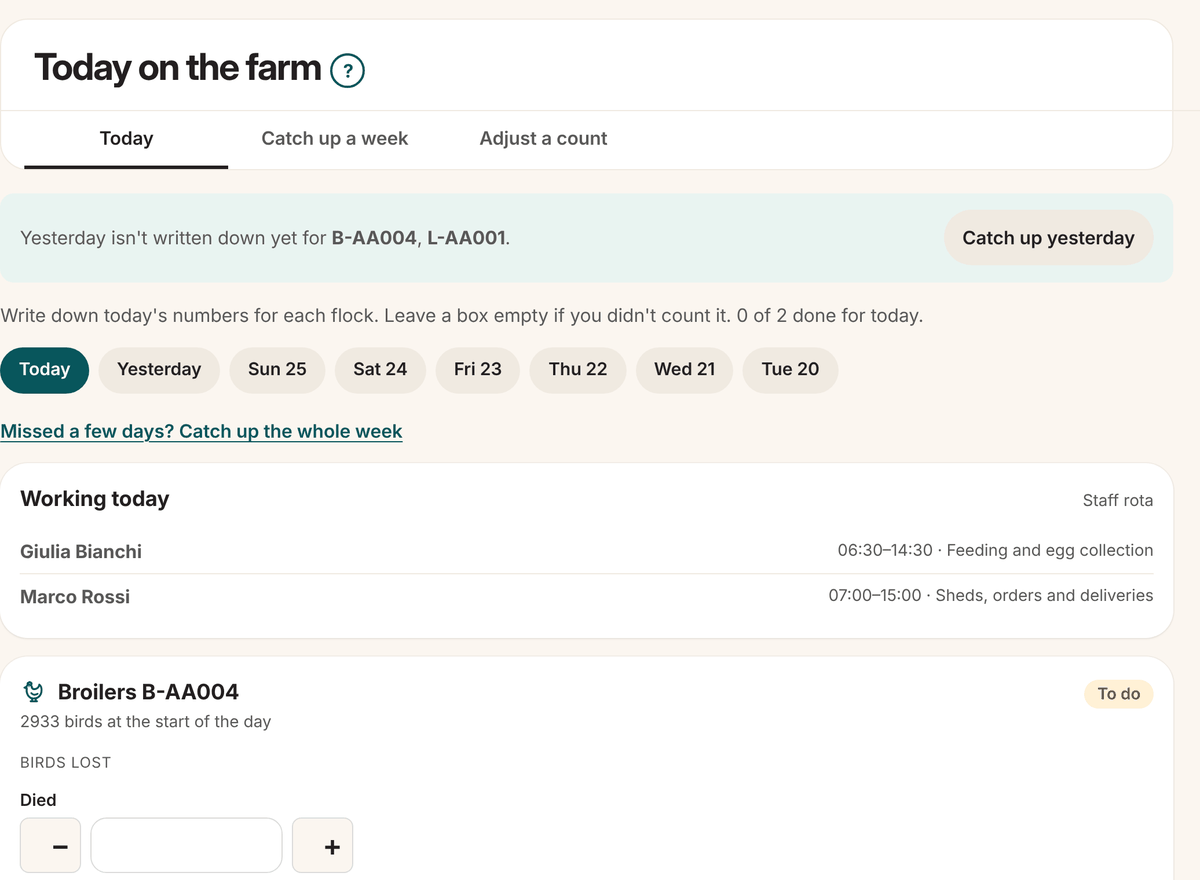
This is the page you will use most. Today on the farm shows every batch on one page, so you can record the day in about a minute.
Open it
- Open To do (the circle with your initials) and click the Record today line.
- On the phone app: Flock > Record today.
Steps
- Each batch has its own card. Type what you counted:
- Broilers: birds that Died (the − and + buttons help), Feed used, Water used and, if you weighed a few birds, their average weight.
- Layers: the eggs collected (by size, if you sort them), birds that died or were culled, and the feed.
- Click Save on that card. The line at the top counts how many are done for today.
Good to know
- Leave a box empty if you didn't count it. Empty is not the same as 0.
- Feed and water are for the whole batch, not per bird.
- From stock: when you have feed in your stock, pick which feed it was and it comes out of your stock by itself. Pick None if it didn't come from your stock.
- Forgot a day? Pick it in the row of days at the top (up to a week back), or click Catch up yesterday when the page offers it. Missed more days? Click Missed a few days? Catch up the whole week. See Add or fix older records.
- Show more on this page at the bottom adds boxes, like water or hens taken out of a layer flock.
- No signal? Save as normal. The numbers wait on the phone and are sent when there's signal again.