The To do list holds everything that needs doing on your farm. Open it from the circle with your initials. The number on the circle is how many jobs are waiting.
Jobs are grouped as Overdue, Today, This week and Later.
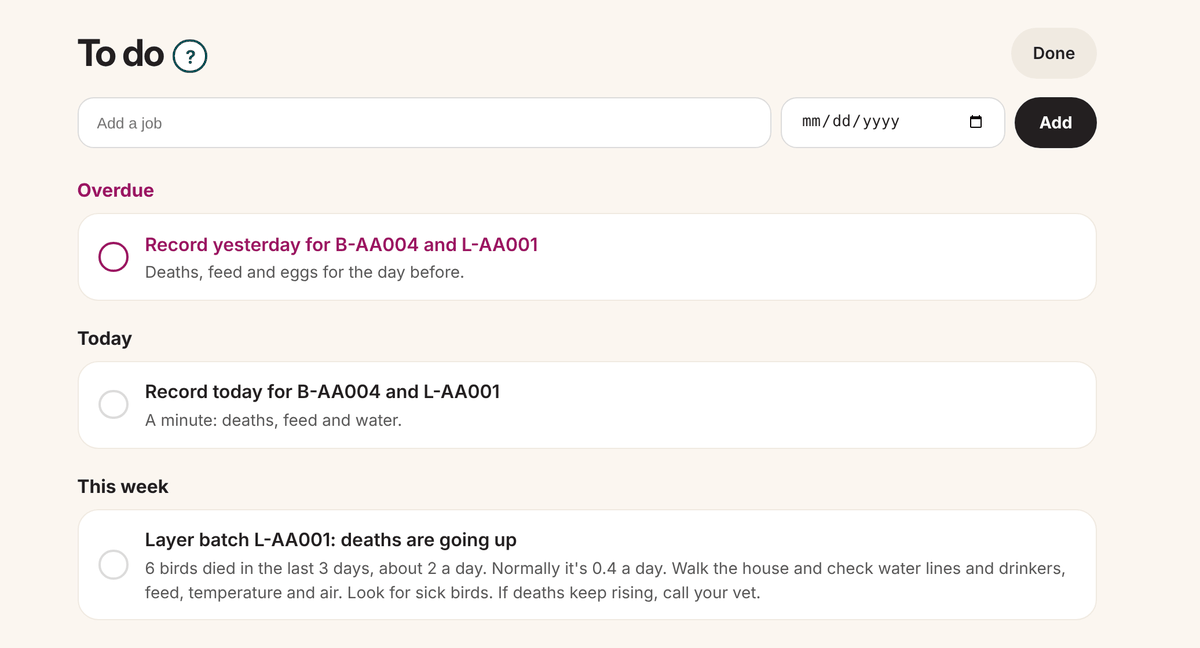
Jobs the app adds for you
- Record today: a batch with today's numbers not typed yet.
- Vaccinations due: planned in the next few days, or late.
- Withdrawal periods: a treated batch that can't be sold yet.
- Bird deaths: clearly more deaths than normal in the last 3 days. Walk the house and call your vet if you are worried.
- Fewer eggs: a laying flock giving clearly fewer eggs than the week before.
- Stock running low and Expiry dates: when to order, and medicine or vaccines close to their expiry date.
- Unpaid orders: an order still not paid after 30 days.
- Deliveries to make: an order to take to a client. Ticking it marks the delivery as delivered.
Your own jobs
Type one line in the box at the top, for example "Fix the drinker in shed 2", pick a day if you want, and click Add.
Ticking a job off
- Click the job to go where you fix it: the batch, the order or the stock item. Once it's fixed, the job goes away by itself.
- Or tick the round box on the left when it's done.
- Ticked something by mistake? Click Done at the top and press Undo.
Choose what the app adds
In Settings, open To do list. There is a switch for each kind of job, one to show your top jobs on Home, and one for a daily email. The email only comes when there is something new.