A broiler batch is one group of meat chickens that arrived on the same day. Add it on the day the chicks arrive.
Steps
- Click the black + and choose Batch, then Broilers.
- Hatched date: the day the chicks hatched. Not sure? Use the day they arrived. The hatch day is day 1.
- Batch cycle (weeks): how many weeks you plan to keep them before selling, often 6 to 8. A 6-week batch ends on day 42.
- Under Hatched birds, tick one kind, Male, Female or Straight-run (mixed), and type how many.
- Click Create batch.
- Next it asks Did you pay for the chicks? Type the price of one chick and the delivery, and click Save. Free or hatched here? Say so, or click Skip and add it later on the batch's Costs.
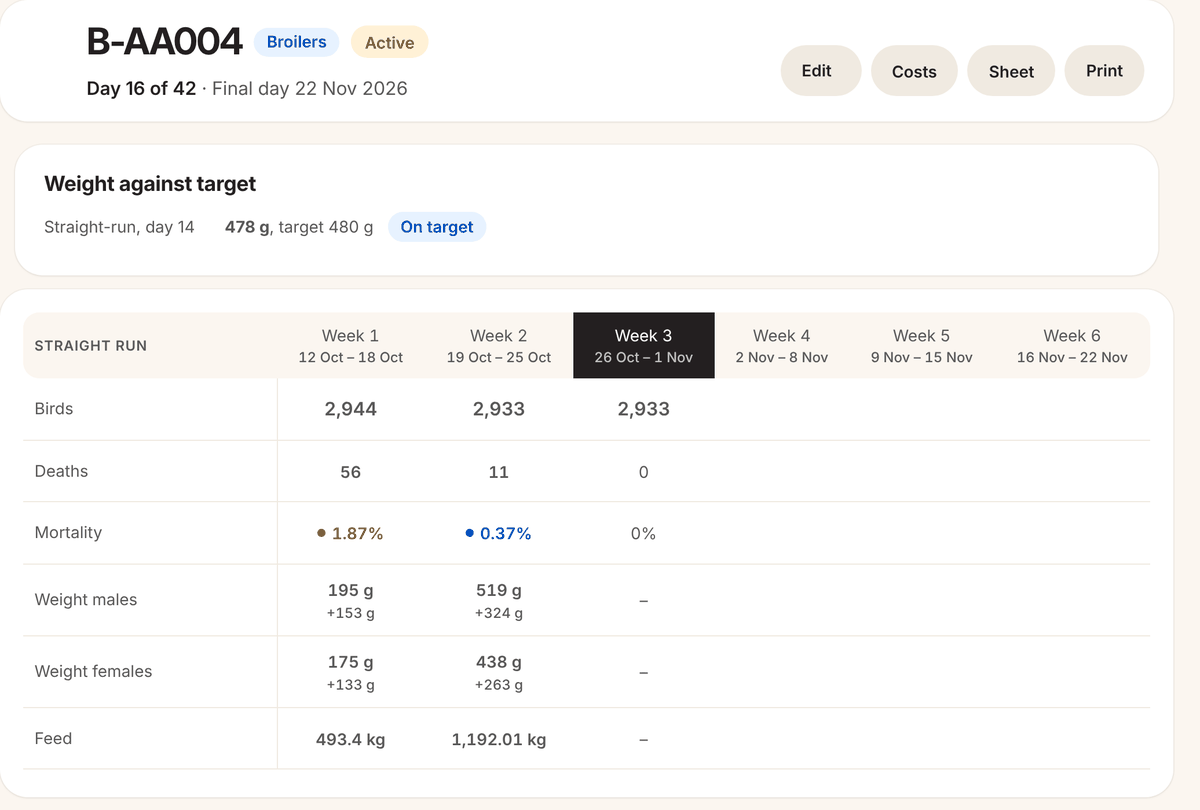
The batch gets a number starting with B, for example B-AA004. From now on it shows on Home, on Broilers, and on the Record today page every day until its final day.
One kind of chick per batch. Bought males and females separately? Make two batches.
The batch page
- The top line says the day, for example Day 15 of 42, and the final day.
- Edit: adjust the bird count, the hatched birds, the hatch date or the final day, see the death and weight records, or archive it.
- Costs: what the batch has cost and the cost per bird. See Costs for each batch.
- Sheet and Print: a paper sheet for the shed.
- A table of the weeks: birds, deaths, mortality, weight and feed. Click a week to see or fix its days.
Next
- Record numbers every day: Record today's numbers.
- Plan the vaccinations: Plan and record vaccinations.